CIPW Norm Mineral Calculation
The CIPW Norm Mineral Calculation module converts whole-rock major element oxide analysis data into idealized norm mineral assemblages, widely used for igneous rock classification, petrological comparison, and silica / aluminum saturation discrimination.
CIPW Norm (Cross-Iddings-Pirsson-Washington norm minerals) was proposed by four petrologists in 1902. GeoChemistry Nexus implements the complete calculation workflow in an Excel-like spreadsheet interface, supporting batch calculation, diagnostic viewing, and CSV export.
Module Features
- Accept major element oxide data row by row (wt%)
- Normalize oxides on an anhydrous basis
- Handle iron distribution (FeO / Fe₂O₃ / FeOT)
- Allocate oxides to norm minerals in fixed priority order
- Output silica saturation, aluminum saturation status, and mass balance diagnostic information
- Export results for subsequent plotting or analysis
Interface Overview
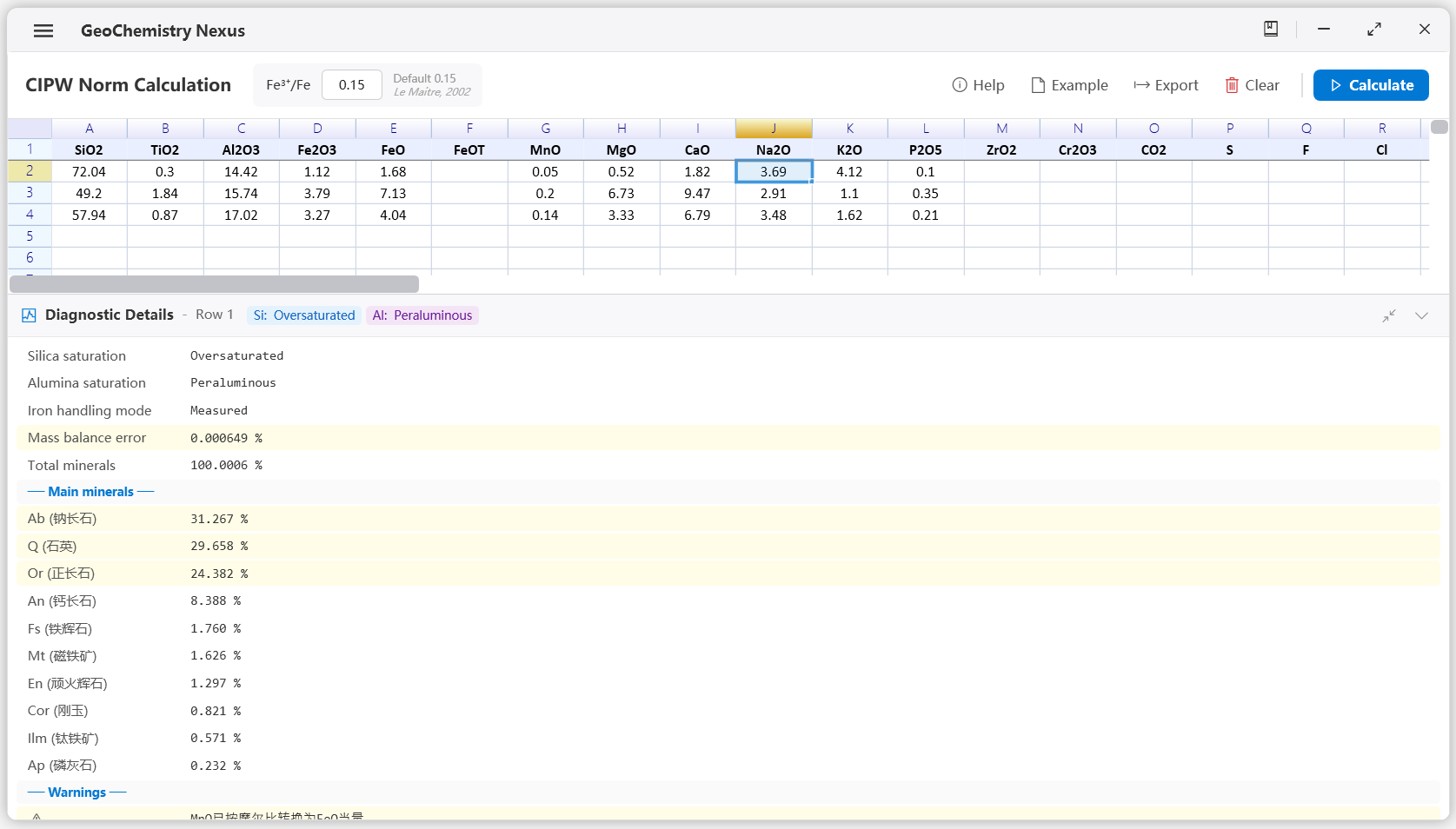
The CIPW page is divided into three areas:
- Top Toolbar — Parameter settings and action buttons
- Data Table — Input oxides, diagnostic columns, and mineral results
- Bottom Diagnostic Panel — Detailed calculation information for the currently selected row
Toolbar Actions
| Button | Description |
|---|---|
| Help | Open the software's built-in algorithm workflow documentation window |
| Sample | Fill three rows of sample data (granite, basalt, andesite) |
| Export | Export the current table as a CSV file |
| Clear | Clear all input and calculation results |
| Run Calculation | Execute CIPW calculation for all rows with valid data |
Fe³⁺/Fe Ratio
When only FeOT (total iron, expressed as FeO equivalent) is provided, the software splits it into FeO and Fe₂O₃ according to the user-set Fe³⁺/Fe ratio.
- Valid range:
0–1 - Default value:
0.15(Le Maitre, 2002)
If measured FeO and Fe₂O₃ values are both provided, the software uses the measured distribution directly and ignores FeOT.
Input Data Requirements
Each row represents one whole-rock sample. Fill in the weight percentage (wt%) of oxides in the input columns.
Supported Input Oxides
| Oxide | Description |
|---|---|
SiO2, TiO2, Al2O3, MgO, CaO, Na2O, K2O, P2O5 | Core major elements |
Fe2O3, FeO, FeOT | See iron handling rules below |
MnO | Converted to FeO equivalent by molar ratio |
ZrO2, Cr2O3 | Accessory / trace element oxides |
CO2, S, F, Cl, SO3 | Volatile components |
You can first complete anhydrous normalization, iron valence estimation, and other steps in the Data Preprocessing module, then paste the processed table into the CIPW module for use.
Iron Input Rules
| Input Situation | Handling |
|---|---|
Both FeO and Fe2O3 provided | Use measured iron distribution |
Only one of FeO or Fe2O3 provided | Missing item treated as 0, with warning |
Only FeOT provided | Split into FeO / Fe₂O₃ by Fe³⁺/Fe ratio |
FeOT provided together with FeO or Fe2O3 | Inconsistent input, FeOT ignored with warning |
| No iron data provided | Treated as 0, with warning |
MnO is always converted to FeO equivalent before calculation.
Recommended Workflow
-
Prepare data
Ensure oxide headers match input columns, values are non-negative wt%. -
Enter data
Paste or input into the table, one sample per row, empty rows automatically skipped. -
Set Fe³⁺/Fe (when using FeOT)
If the dataset requires a different iron oxidation assumption, adjust this ratio in the toolbar. -
Click "Run Calculation"
The software processes all valid rows and writes results to the right-side columns. -
View diagnostic information
Select a result row and view silica / aluminum saturation, iron handling mode, major mineral composition, and warnings in the bottom panel. -
Export results
Export the complete table (input + diagnostics + minerals) as CSV for archiving or subsequent analysis.
Output Column Descriptions
Calculation results appear to the right of the input area, separated by column │.
Diagnostic Columns
| Column Name | Description |
|---|---|
| Silica Saturation | Oversaturated / Saturated / Undersaturated |
| Aluminum Saturation Status | Peralkaline / Peraluminous / Metaluminous |
| Mass Balance Error | Deviation of mineral mass sum from 100% |
Norm Mineral Columns
Mineral abbreviations follow CIPW convention; in the Chinese interface, headers display Chinese mineral names. Common minerals include:
| Abbreviation | Mineral |
|---|---|
Q | Quartz |
Or, Ab, An | Orthoclase, Albite, Anorthite |
Le, Ne, Kp | Leucite, Nepheline, Kalsilite |
Di, Hd, Wo | Diopside, Hedenbergite, Wollastonite |
En, Fs, Fo, Fa | Enstatite, Ferrosilite, Forsterite, Fayalite |
Mt, Hm, Ilm | Magnetite, Hematite, Ilmenite |
Cc, Ap, Z | Calcite, Apatite, Zircon |
Only minerals with content exceeding the display threshold are shown per row.
Diagnostic Panel
After calculation completes, click any result row to view detailed diagnostics:
- Silica Saturation — Highlighted when undersaturated
- Aluminum Saturation — Highlighted when peralkaline
- Iron Handling Mode — Shows whether iron data is measured, estimated, or missing
- Mass Balance Error — Highlighted when deviation is large
- Major Mineral Composition — Sorted by content in descending order
- Warnings — Such as missing iron data, inconsistent FeOT input, etc.
Use the button on the right side of the status bar to expand, collapse, or maximize the diagnostic panel.
Calculation Algorithm
The calculation follows the classic CIPW norm mineral workflow:
1. Data Preprocessing & Normalization
- Anhydrous normalization of input major element oxide data (normalized to 100%)
- Handle iron distribution: split FeOT into FeO and Fe₂O₃ according to user-set Fe³⁺/Fe ratio
- Merge MnO into FeO by molar ratio
- Convert oxide weight percentages to moles
2. Form Volatile Minerals
Consume volatile components in priority order:
- Calcite (Cc): CO₂ + CaO
- Fluorite (Fl): F + CaO
- Pyrite (Py): S + FeO
- Halite (Hl): Cl + Na₂O
- Thenardite (Th): SO₃ + Na₂O
3. Form Accessory Minerals
- Zircon (Z): ZrO₂ + SiO₂
- Apatite (Ap): P₂O₅ + CaO
- Chromite (Cm): Cr₂O₃ + FeO
- Ilmenite (Ilm): TiO₂ + FeO
- Sphene (Tn): TiO₂ + CaO + SiO₂
- Rutile (Ru): Residual TiO₂
4. Determine Aluminum Saturation Status
- Peralkaline: Na₂O + K₂O > Al₂O₃
- Metaluminous: Al₂O₃ ≤ CaO + Na₂O + K₂O
- Peraluminous: Al₂O₃ > CaO + Na₂O + K₂O
5. Form Feldspars and Alkali Silicates
- Orthoclase (Or): K₂O + Al₂O₃ + 6SiO₂
- Albite (Ab): Na₂O + Al₂O₃ + 6SiO₂
- Anorthite (An): CaO + Al₂O₃ + 2SiO₂
- Corundum (Cor): Residual Al₂O₃ (peraluminous case)
- Aegirine (Ac): Na₂O + Fe₂O₃ + 4SiO₂ (peralkaline case)
- Residual alkali silicates (ns, ks)
6. Form Iron Oxides
- Magnetite (Mt): Fe₂O₃ + FeO
- Hematite (Hm): Residual Fe₂O₃
7. Form Mafic Silicate Minerals
- Diopside (Di): CaO + MgO + 2SiO₂ (magnesian end-member)
- Hedenbergite (Hd): CaO + FeO + 2SiO₂ (ferrous end-member)
- Enstatite (En): MgO + SiO₂
- Ferrosilite (Fs): FeO + SiO₂
- Wollastonite (Wo): Residual CaO + SiO₂
8. Silica Saturation Correction
- Oversaturated (SiO₂ remaining): Form quartz (Q)
- Saturated (SiO₂ exactly used up): No quartz, no feldspathoids
- Undersaturated (SiO₂ insufficient): Transform minerals in priority order —
- Hypersthene (En + Fs) → Olivine (Fo + Fa)
- Orthoclase (Or) → Leucite (Le)
- Leucite (Le) → Kalsilite (Kp)
- Albite (Ab) → Nepheline (Ne)
9. Result Output
- Multiply each mineral's moles by its molar mass to obtain norm mineral mass
- Normalize to weight percentage (wt%) for output
- Report diagnostics such as silica saturation, aluminum saturation status, and mass balance error
Click the Help button in the toolbar to view the same algorithm workflow documentation within the software.
References
- Cross, W., Iddings, J.P., Pirsson, L.V., Washington, H.S. (1902). A Quantitative Chemico-Mineralogical Classification and Nomenclature of Igneous Rocks.
- Le Maitre, R.W. (2002). Igneous Rocks: A Classification and Glossary of Terms. Cambridge University Press.
- Kelsey, C.H. (1965). Calculation of the CIPW norm. Mineralogical Magazine, 34, 276–282.